

Intro to Python#
In this section we are going to go over some basic operations in Python that will guide you through the course. This tutorial was heavily based on this repo.
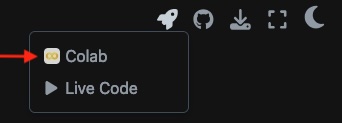
If you want to try out some of the operations below one of the easiest ways is to use Google Colab.

You can also run read this file and run the codes on Google Colab by simply clicking in the rocket above and select Google Colab,
Basic Operations#
Most of time in Python we don’t need to specify data types. Asking Python to perform 1+2 it will return 3, asking to do 1/2 will return a float 0.5.
The basic operations are,
Addition:
10 + 2Subtraction:
10 - 2Multiplication:
10*2Division:
10/2Exponentiation:
10**2
Variables and printing#
When working with multiple variables, it is useful to assign each variable a name to later change the number in your calculations.
For example, instead of computing the sum 10+2 directly, we could do,
a = 10
b = 2
c = a + b
Where the computer has stored the sum into the c variable. To see the result of the addition, you need to use the print function,
print(c)
12
You can also declare multiple variables together on the same line,
x,y = 1,2
print(x)
print(y)
print(x,y)
1
2
1 2
You can also store and print strings in the same way,
string_word = 'Hello World'
print(string_word)
Hello World
You can also print a number and a string,
a = 1000
print('The value of a is:',a)
The value of a is: 1000
Lists#
If we want to evaluate a function on a whole list of points we need to create an empty list and then populate it. For example,
empty_list = []
mixed_list = [1,2,'Hello world',False]
float_list = [1.2,2.3,4.5,2.0,4.5]
#You should try printing this lists
[1.2, 2.3, 4.5, 2.0, 4.5]
As we can see lists entries don’t have to be the same type. It’s important to note that a list,
is ordered
can contain duplicates
can be changed (the Python word for it is mutable)
it’s always denoted by square brackets.
In the NumPy section we introduce the concept of array which is a better structure for storing and retrieving data.
Operations with lists#
Given a list we can check its length len,
print(len(empty_list))
print(len(mixed_list))
0
4
We can use the append command to add items to a list,
empty_list = []
empty_list.append(3)
print(empty_list)
[3]
We can also append a variable in a list that is already populated,
my_list = [1,2,3.4,'Hello']
my_list.append(3)
print(my_list)
[1, 2, 3.4, 'Hello', 3]
One of the most important things is to be able to access a specific position, or variable, in our list L. Here is the syntax:
the whole list:
L[:]everything after (and including) index position
i:L[i:]everything before index position
i:L[:i]everything before the position
jsteps from the end:L[:-j]everything after (and including) the position
jsteps from the end:L[-j:]
We can access individual elements of a list by specifying their index in the list, which starts at 0. The best way to learn this is to play around with some list. First we create a list,
my_list = []
for i in range(10):
    my_list.append(i)
print(my_list)
[0, 1, 2, 3, 4, 5, 6, 7, 8, 9]
Then we can print the values according to positions,
print(my_list[:])
print(my_list[0])
print(my_list[-2:])
print(my_list[1:])
print(my_list[:-3])
[0, 1, 2, 3, 4, 5, 6, 7, 8, 9]
0
[8, 9]
[1, 2, 3, 4, 5, 6, 7, 8, 9]
[0, 1, 2, 3, 4, 5, 6]
Functions#
A function in Python works the same as a function in math: you define an input and an output. Then, given the input the function will provide you the output.
Functions in Python are defined by the
defkeyword.After the
defkeyword, comes the function’s name and then a list of inputs enclosed by()and followed by a:.Indented below is the block of code that you’ll use to write the code to be executed when you call the function and you can define a
returnstatement, which returns a particular value when the function is executed.
For example, we can define a function that takes one input and returns one output,
def f(x):
    return x**3+1
This defines the function \(f(x) = x^3 + 1\) and to evaluate the function in a given input you do,
print(f(2))
9
So entering \(f(2)\) you’ll get the output 9, which is the value of \(2^3 + 1\).
We can also apply a function on a list, finding the mean of a list of numbers. Using the function sum() which returns the addition of a sequence of numbers, and len() which returns the length of the sentence of numbers.
numbers = [0,1,2,3,4,5,6,7,8,9]

def mean(list):
    return sum(list)/len(list)

print(mean(numbers))
4.5
Another quick way to define a function is to use Python’s lambda syntax,
f = lambda x : x**3 + 1
print(f(2))
9
In general, the syntax is,
function_name = lambda parameters: return values
Conditional statements#
There are instances where we want to only execute a particular block of code if a certain condition is true. For that, Python has if statements,
if condition:
    #code to execute if condition is true
Indented below, is the code that executes if the condition is
True.To handle multiple conditions, we can use
elifandelsestatements.An
elifstatement is another conditional that is only checked if the priorifisFalse.An
elsecondition only works if all previous conditions areFalse.
For multiple conditions, the syntax is,
if condition:
    # code to execute if condition is true
elif condition:
    # code to execute if above condition is false and this condition is true
else:
    # code to execute if all previous conditions are false
Comparison operations,
Equals
x == yNot Equal
x != yLess Than (strictly)
x < yGreater Than (strictly)
x > yLess Than or Equal to
x <= yGreater Than or Equal to
x >= y
Logical operators,
x and yReturnsTrueif bothxandyareTruex or yReturnsTrueifxoryareTruenot xReturnsTrueifxisFalse
Here are some examples,
c = 0

if c < 0:
    print('c is negative')
elif c == 0:
    print('c is zero')
else:
    print('c is positive')
#You can  change the value of c and play around.
c is zero
Here we define a function that only calculates the square root if the input is non-negative,
def square_root(x):
    if x>= 0:
        return x**0.5
    else:
        return 'Cannot take the square root of a negative number'
Calling the square_root function,
print(square_root(16))
print(square_root(-1))
4.0
Cannot take the square root of a negative number
Another common operator is the modulo operator %, which returns the remainder from the division of two numbers,
x % yreturns the remainder whenxis divided byy.
print(10 % 2)
print(100 % 19)
0
5
Practice#
Try to create a function in Python that determines if a number is even or odd. You can start by defining a function called even_or_odd and then in the body of the function write the necessary operations.
Loops#
When programming, there are times when you need to repeatedly perform a specific operation/action while updating certain parameters. In these situations, we use loops,
In particular, the for loop has the following structure,
for item in sequence:
    #code to be executed
The item is the current iteration of the loop and the sequence is through what is being iterated over (list,range,dictionary,array,…). For example, we can loop over a list of numbers and print the square of each number,
numbers = [0,1,3,4,5,6,19,20]

for number in numbers:
    print(number**2)
0
1
9
16
25
36
361
400
Practice#
Using a for loop, implement a function that computes the factorial of non-negative integers. Remember, a factorial of a non-negative integer \(n\) is the product of all positive integers less than or equal to \(n\).
These are the basics functions built in Pyhton, when dealing with more complicate functions we will need Python libraries such as Numpy and SymPy, which are going to be discussed next.